# Configure Source Control

#### Configure Source Control  


When working with a solution stored in a repository and using Scene Composer's built-in source control integration, you must configure an external comparison and merge tool.

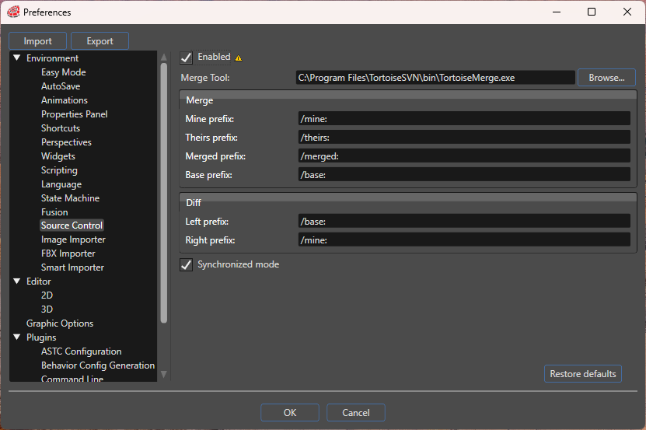
To configure this, open the Preferences dialog (**File** &gt; **Preferences** in the menu bar). In the **Source Control** section, specify the application to be used for merge and diff operations. You can also define the command-line parameters required for each operation (e.g. **Merge** and **Diff**).

Before performing any merge operations, ensure that the external merge tool is **enabled** by selecting the corresponding checkbox.

<div drawio-diagram="8955"><img src="https://doc3161en.candera.eu/uploads/images/drawio/2026-02/drawing-5-1771575834.png" alt=""/></div>

<table border="1" id="bkmrk-%E6%9C%89%E5%8A%B9-%E6%9C%89%E5%8A%B9%E3%81%AE%E5%A0%B4%E5%90%88%E3%81%AF%E3%80%81%E3%83%9E%E3%83%BC%E3%82%B8%E3%83%84%E3%83%BC%E3%83%AB%E3%81%AE%E4%BD%BF%E7%94%A8%E3%81%8C" style="border-collapse: collapse; width: 89.881%;"><colgroup><col style="width: 19.8899%;"></col><col style="width: 80.1101%;"></col></colgroup><tbody><tr><td>Enabled</td><td>If enabled, the use of the configured merge tool is enabled.</td></tr><tr><td>Merge Tool</td><td>Configures the path to the external merge tool to use.</td></tr><tr><td>Merge</td><td>Specifies the commands for merge operations.</td></tr><tr><td>Diff</td><td>Specifies the commands for diff operations.</td></tr><tr><td>Synchronized mode</td><td>If enabled, Scene Composer automatically retrieves the solution status from the server. Because communication with the server can be time-consuming, you may choose to disable this option. In that case, you can manually update the status by selecting **Refresh status** from the source control context menu whenever needed. </td></tr></tbody></table>

<p class="callout info">The value of the **Enabled** checkbox is evaluated only when a solution is opened or created.</p>

---