# Cultures

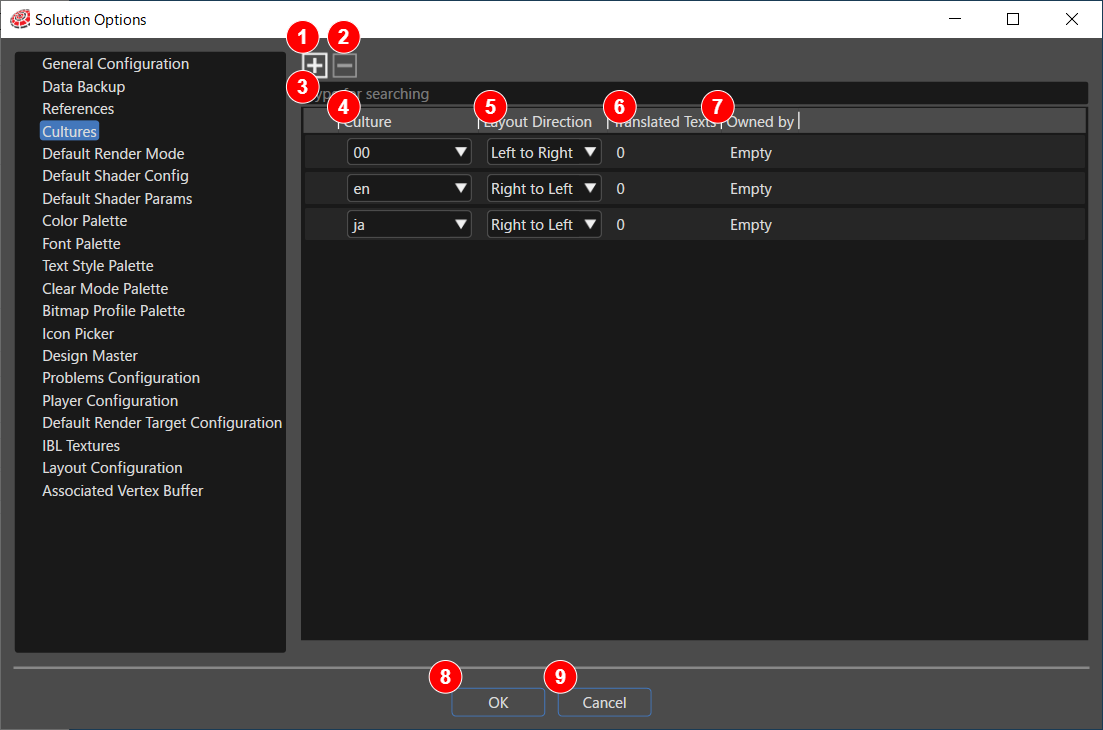
In order to compose texts in different languages, a culture (language setting) must first be created.

<div drawio-diagram="6647"><img src="https://doc3161en.candera.eu/uploads/images/drawio/2024-09/drawing-4-1725599409.png" alt=""/></div>

<table border="1" id="bkmrk-%281%29-%E3%82%AB%E3%83%AB%E3%83%81%E3%83%A3%E3%83%BC%E3%82%92%E8%BF%BD%E5%8A%A0%E3%83%9C%E3%82%BF%E3%83%B3-%E3%82%AB%E3%83%AB%E3%83%81%E3%83%A3" style="border-collapse: collapse; width: 100%;"><colgroup><col style="width: 8.89988%;"></col><col style="width: 22.2497%;"></col><col style="width: 68.8504%;"></col></colgroup><tbody><tr><td class="align-center">(1)</td><td class="align-left">Add Culture button</td><td>Add a new culture setting row.

</td></tr><tr><td class="align-center">(2)</td><td class="align-left">Remove Culture button</td><td>Delete the selected culture setting row.</td></tr><tr><td class="align-center">(3)</td><td class="align-left">Search field</td><td>You can search for a specific text entry by entering any string into the search field.

</td></tr><tr><td class="align-center">(4)</td><td class="align-left">Culture</td><td>You can select a language from the Culture drop-down menu. This language will serve as the target language for the localization.

</td></tr><tr><td class="align-center">(5)</td><td class="align-left">Layout Direction</td><td>Selects the direction in which the text is displayed. Normally, the appropriate text orientation is selected automatically, depending on the selected Culture.

</td></tr><tr><td class="align-center">(6)</td><td class="align-left">Translated Texts</td><td>Shows the number of text entries linked to the culture.</td></tr><tr><td class="align-center">(7)</td><td class="align-left">Owned by</td><td>The name of the solution for which this setting has made is displayed.</td></tr><tr><td class="align-center">(8)</td><td class="align-left">OK button</td><td>Use this button to save settings.</td></tr><tr><td class="align-center">(9)</td><td class="align-left">Cancel button</td><td>Use this button to close the dialog box without saving settings such as added or deleted cultures.

</td></tr></tbody></table>

<div class="contents" id="bkmrk-to-add-a-new-culture"><div class="contents"><div class="contents"><div class="textblock">

- Similar settings can also be made via the Culture Solution Options button on the toolbar.
- For information on how to set up multiple languages after setting up a culture, please click <span style="color: rgb(230, 126, 35);">[here](https://doc3161en.candera.eu/books/scene-design/page/create-and-manage-cultures-and-translatable-texts)</span>.

</div></div></div></div>