# Script

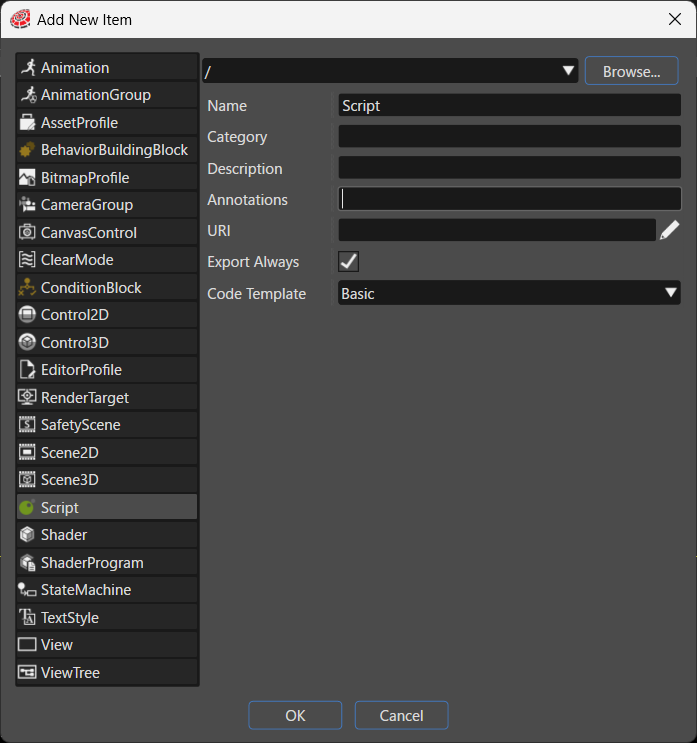
Adds a new script to the solution. You select Empty, Basic, or Full as the code template. The system adds the created script to the solution as a file with the `.lua` extension.

<div drawio-diagram="9042"><img src="https://doc3161en.candera.eu/uploads/images/drawio/2026-06/drawing-4-1782107443.png" alt=""/></div>

<table border="1" id="bkmrk-%E9%A0%85%E7%9B%AE%E5%90%8D-%E8%AA%AC%E6%98%8E-%E4%BF%9D%E5%AD%98%E5%85%88%E3%83%91%E3%82%B9-%E6%96%B0%E8%A6%8F%E4%BD%9C%E6%88%90%E3%81%99%E3%82%8B%E3%82%A2" style="width: 800px; border-collapse: collapse;"><thead><tr><th style="width: 22.5237%; background-color: rgb(35, 111, 161);"><span style="color: rgb(255, 255, 255);">Item</span></th><th style="width: 77.4763%; background-color: rgb(35, 111, 161);"><span style="color: rgb(255, 255, 255);">Description</span></th></tr></thead><tbody><tr><td style="width: 22.5237%;">Destination path</td><td style="width: 77.4763%;">Specifies the folder in the solution where the system places the new item. Click **Browse...** to select an existing folder.</td></tr><tr><td style="width: 22.5237%;">Name</td><td style="width: 77.4763%;">Sets the name of the new item.</td></tr><tr><td style="width: 22.5237%;">Category</td><td style="width: 77.4763%;">Specifies the category that the new item belongs to. The Toolbox uses this category to classify the item.</td></tr><tr><td style="width: 22.5237%;">Description</td><td style="width: 77.4763%;">Describes the new item in detail.</td></tr><tr><td style="width: 22.5237%;">Annotations</td><td style="width: 77.4763%;">Serves as storage for notes and other project-related information. The system exports the entered text to the HMI report.</td></tr><tr><td style="width: 22.5237%;">URI</td><td style="width: 77.4763%;">You can set any URI. If you enter a valid URI, clicking it launches the browser and displays the contents of the link.</td></tr><tr><td style="width: 22.5237%;">Export Always</td><td style="width: 77.4763%;">Specifies whether the system always includes this item as part of the asset.</td></tr><tr><td style="width: 22.5237%;">Code Template</td><td style="width: 77.4763%;">Selects the type of code template that you use when you create the script. 

- **Empty**: An empty template that contains no code.
- **Basic**: A code template that contains the commonly used callback functions.
- **Full**: A code template that contains the complete set of callback functions that you implement.

</td></tr></tbody></table>