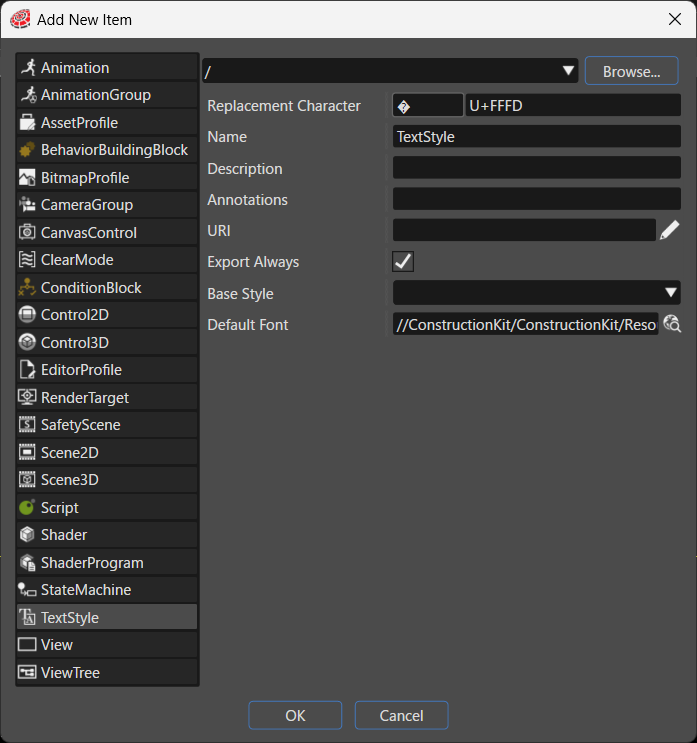
| Destination path | Specifies the folder in the solution where the system places the new item. Click **Browse...** to select an existing folder. |
| Replacement Character | Specifies the character that the system uses as a substitute when the requested character is not available in the font. The default value is U+FFFD. |
| Name | Sets the name of the new item. |
| Description | Describes the new item in detail. |
| Annotations | Serves as storage for notes and other project-related information. The system exports the entered text to the HMI report. |
| URI | You can set any URI. If you enter a valid URI, clicking it launches the browser and displays the contents of the link. |
| Export Always | Specifies whether the system always includes this item as part of the asset. |
| Base Style | Specifies the base Style. A GetFont method call for a code point in a range that is not defined in a StyleEntry is resolved by the base Style specified here. The following are typical styles included in the ConstructionKit (they may differ depending on your environment).
- ConstructionKit.ArabicRegularStyle
- ConstructionKit.EnglishRegularStyle
- ConstructionKit.JapaneseRegularStyle
- ConstructionKit.KoreanRegularStyle
- ConstructionKit.OpenSans25 / OpenSans35 / OpenSans96
- ConstructionKit.OpenSansRegular25 / OpenSansRegular35 / OpenSansRegular96
- ConstructionKit.Roll Lens
- ConstructionKit.SimplifiedChineseRegularStyle
- ConstructionKit.ThaiRegularStyle
- ConstructionKit.Vera25 / Vera32 / Vera96
|
| Default Font | Specifies the default font by path. When no base Style is defined, the GetFont method retrieves the default font specified here for code points that do not fall within any range defined in StyleEntry. Click the browse button on the right to select a font. |