
Developing Applications with CMake
General Introduction
Introduction
This page will lead you through the process of creating a new CGI Studio project with CMake. All necessary steps will be covered in this document. At the end you will have a running application based on CGI Studio. The Solution creation in Scene Composer is not part of this document. Therefore please have a look into the CGI Studio Documentation.
Folder structure
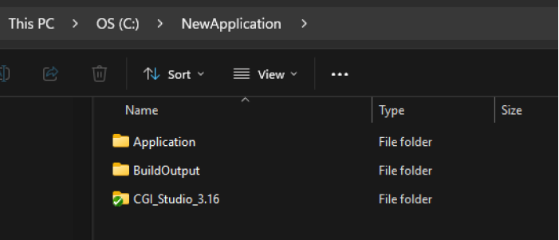
SThe CGI Studio product folder with all the necessary modules can be located at any location. For the project we recommend to have a different folder. The same for the build output.
For example something like this:
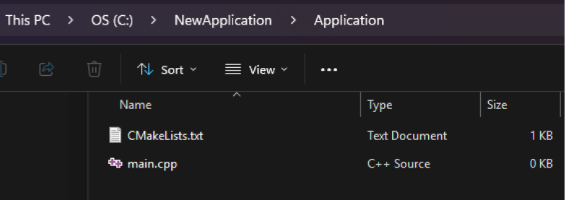
The Application folder contains the following files:
The BuildOutput folder is an empty folder and shall store the build artefacts after configuring and generating with CMake.
The CGI_Studio_x.xx folder should contain at least the following CGI Studio modules:
- bin
- cgi_studio_3psw
- cgi_studio_candera
- cgi_studio_controls
- cgi_studio_courier
- cgi_studio_devices
- cgi_studio_docs
- cgi_studio_player
- cgi_studio_schost
- cmake
- featstd
Choosing a Base Application
CMake Project File
To start a custom project, first choose between either to base the application on Player, CourierSampleApp, or start from scratch with an empty CMake project.
With the first, you start by having all the features available from CGI Studio, from which you will have to strip the non-used ones and add custom parts when needed.
With the second, you start with a smaller set of features, such as Courier Messaging Framework, Font Engine and Render Engine.
With the third, you start by having none of the features, and you will have to add the desired ones.
In the Application folder there needs to be the CMakeLists.txt file as a entry point for the CMake project. The first statement is the cmake_minimum_required(VERSION 3.10).
The next command is to set the name of the project: project(MyProject).
To have the CGI Studio included into your project, use the command: include(“PATH2CGISTUDIO/cmake/CGIStudioCommon.cmake”). This cmake file includes all modules necessary for a CGI Studio project, like the 3psw, candera, courier, controls, schost, featstd, etc.
To have the application based on the Player application, add_subdirectory(“PATH2CGISTUDIO/cmake/Candera/Player/Library” PlayerLib).
To have it based on CourierSampleApp, add_subdirectory(“PATH2CGISTUDIO/cmake/Apps/Courier/CourierSampleApp" ApplicationLib)
After this, we need to add our project as executable with add_executable(MyProject main.cpp)
And finally link the library we added earlier with target_link_libraries(MyProject PRIVATE ApplicationLib) or target_link_libraries(MyProject PRIVATE PlayerLib)
The PATH2CGISTUDIO can be an absolute or a relative one. If it is a relative path, it will be evaluated with respect to the current directory.
For further information about CMake, please have a look into the CMake project site: https://cmake.org/cmake/help/latest/manual/cmake-commands.7.html
CMake Project File – Player
When starting from Player, along with the application, you will have also the panel that will allow you to modify the state of your application, e.g. property values, starting animations, changing culture, record and play.
You can refer to CGI Studio documentation for more details on the Player.
For information about adding custom behaviors to a Player-based application, please refer to the Player section in Adding Additional Behaviors.
CMake Project File – CourierSampleApp
When starting from CourierSampleApp, only the basics to have a runnable CGI Studio application will be included, such as Courier Messaging Framework, Font Engine and Render Engine. From here, you can add custom behaviors to customize your application.
For information about adding custom behaviors to a CourierSampleApp-based application, please refer to the CourierSampleApp section in Adding Additional Behaviors.
Empty Project
Setting up a new project — minimal example
For information about adding custom behaviors to an Empty Project-based application, please refer to the Empty Project section in Adding Additional Behaviors.
.\TestProject shows the smallest possible consumer project:
cmake_minimum_required(VERSION 3.14.5)
cmake_policy(VERSION 3.14.5)

project(DebugTestApplication)
add_executable(${PROJECT_NAME})

set(PROJECT_CGISTUDIO_ROOT_PATH "" CACHE PATH "Location of CGIStudio")
if(NOT(PROJECT_CGISTUDIO_ROOT_PATH STREQUAL ""))
	set(CANDERA_CUSTOM_BEHAVIORSET_ENABLED ON CACHE INTERNAL "" FORCE)

	include("${PROJECT_CGISTUDIO_ROOT_PATH}/cmake/CGIStudioCommon.cmake")

	add_subdirectory(${PROJECT_CGISTUDIO_ROOT_PATH}/cmake/Candera/${FRAMEWORK_LIBRARY} ${FRAMEWORK_LIBRARY})

	include("${CMAKE_CURRENT_LIST_DIR}/FileList.cmake")
	# ... source_group, include dirs, target_link_libraries ...
endif()
Steps to create a new project from scratch:
- Create a project directory with a
CMakeLists.txtand aFileList.cmake. - In
CMakeLists.txt:project(<Name>),add_executable/add_library. - Set (or receive via cache)
PROJECT_CGISTUDIO_ROOT_PATH(orCANDERA_ROOT_LOCATION, depending on which pattern is used) pointing at the checkout root that containscmake/. include("<root>/cmake/CGIStudioCommon.cmake")to get all common paths and settings.set(FRAMEWORK_LIBRARY "Candera" CACHE INTERNAL ...)andadd_subdirectory(<root>/cmake/Candera/${FRAMEWORK_LIBRARY} ${FRAMEWORK_LIBRARY})to pull in the engine (this transitively brings infeatstd,TextEngine, device libs,BehaviorSet, and optionallyCourier).include("${CMAKE_CURRENT_LIST_DIR}/FileList.cmake")for the project's own sources.- Use
source_group(TREE ...)twice (once filtered to "internal" project sources, once inverted for "external"/framework sources) — this is the standard IDE-grouping idiom used throughout the tree. target_include_directories(${PROJECT_NAME} PUBLIC ...).target_link_libraries(${PROJECT_NAME} PUBLIC ${FRAMEWORK_LINK_LIBRARY})(i.e. link againstCandera).
FileList.cmake for such a project is a plain one-level file list:
target_sources(${PROJECT_NAME}
	PRIVATE
	${CMAKE_CURRENT_LIST_DIR}/CMakeLists.txt
	${CMAKE_CURRENT_LIST_DIR}/FileList.cmake
	${CMAKE_CURRENT_LIST_DIR}/Source.cpp
)
Common Cmake Part
1. Big picture
Every buildable application starts from a project-specific CMakeLists.txt (the entry point). This entry point:
- Declares the executable/library target (
project(),add_executable()/add_library()). - Includes
cmake/CGIStudioCommon.cmake— the common bootstrap script that every target in the whole tree includes (directly or indirectly, guarded viainclude_guard(GLOBAL)). - Pulls in the required framework parts via
add_subdirectory(...)(e.g.Candera,Courier,featstd,BehaviorSet,SCHost). - Collects its own source files via a local
FileList.cmake. - Wires everything together with
target_include_directories,target_link_libraries, andtarget_compile_definitions.
```mermaid
flowchart TD
	A[Consumer CMakeLists.txt entry point] --> B[CGIStudioCommon.cmake global bootstrap]
	B --> C[CanderaConstants.cmake]
	B --> D[Internal/CGIStudioInternal.cmake optional]
	B --> E[Utils/CgiUtils.cmake]
	A --> F[add_subdirectory Candera]
	A --> G[add_subdirectory Courier]
	A --> H[add_subdirectory BehaviorSet]
	A --> I[Local FileList.cmake]
	F --> J[featstd]
	F --> K[TextEngine]
	F --> L[Device / Platform]
	F --> H
	G --> M[Toolchain.cmake]
	G --> N[Platform.cmake]
	L --> O[cgi_studio_devices toolchain and platform def]
```
2. CGIStudioCommon.cmake — the shared bootstrap
Included by (almost) every CMakeLists.txt in the tree. Responsibilities:
include_guard(GLOBAL)— safe to include multiple times from different subdirectories.- Includes standard CMake helper modules (
CMakePrintHelpers,CMakeDependentOption,FeatureSummary,CMakePackageConfigHelpers,ExternalProject). - Resolves
CANDERA_ROOT_PATH(source checkout root) fromCANDERA_ROOT_LOCATION(settable by consumer) or by walking up from the cmake folder itself. - Defines all the important root path variables used everywhere else, e.g.:
CANDERA_CANDERA_SRC_ROOT_PATH→cgi_studio_candera/srcCANDERA_COURIER_SRC_ROOT_PATH→cgi_studio_courier/srcCANDERA_FEATSTD_SRC_ROOT_PATH→featstd/srcCANDERA_SCHOST_SRC_ROOT_PATH→cgi_studio_schost/srcCANDERA_3PSW_SRC_ROOT_PATH/CANDERA_3PSW_ROOT_PATH→ third-party softwareCANDERA_DEVICES_PATH→cgi_studio_devices/srcCANDERA_CMAKE_ROOT_PATH→ thiscmakefolder itselfCANDERA_GENERATED_ROOT_DIR→ generated sources output (<build>/gensrc)
- Includes
CanderaConstants.cmake(shared constant/string definitions) and, if present, an internal-onlyInternal/CGIStudioInternal.cmake. - Defaults
CMAKE_BUILD_TYPEtoReleasefor non-MSVC generators. - Enables VS solution folders (
USE_FOLDERS). - Includes
Utils/CgiUtils.cmake(generic helper functions/macros used across the whole tree).
Because of the include guard, it is safe for every sub-project (Candera, Courier, Player, custom behavior projects, …) to include this file again — the second and later includes are no-ops.
3. Folder structure of cmake/
cmake/
├── CGIStudioCommon.cmake        # global bootstrap (see above)
├── CanderaConstants.cmake       # shared constants (names, paths, defaults)
├── CppVersion.cmake             # sets C/C++ standard
├── CgiAppBuildType.cmake        # defines CGIAPP_BUILD_TYPE (native exe / dll / static lib, etc.)
├── CgiVersion.cmake             # version handling
├── Utils/
│   ├── CgiUtils.cmake           # generic utility macros/functions
│   ├── CgiTryCompile.cmake      # try_compile helpers
│   ├── XcdlGeneration.cmake     # XML/code generation helpers
│   ├── WidgetsetGenerator.cmake # legacy WidgetSet.cpp generator
│   └── SolutionNaming.cmake     # generates solution names
├── Internal/
│   ├── CGIStudioInternal.cmake  # optional internal-only overrides
│   ├── Coverage/                # code coverage integration (optional include)
│   └── StaticAnalysis/ClangTidy.cmake (optional include)
├── 3psw/                        # third-party software (3psw = "3rd party software")
│   ├── ijg/                     # e.g. libjpeg
│   ├── lodepng/
│   └── Devices/                 # 3psw pieces that are device-specific
├── Candera/
│   ├── Candera/                 # the Candera engine library itself
│   │   ├── CMakeLists.txt
│   │   ├── EngineDefinitions.cmake
│   │   ├── PlatformInclude.cmake
│   │   ├── MonitorDefinitions.cmake
│   │   ├── VersionDefinitions.cmake
│   │   └── Device/               # CanderaDevice<Name> target (per-device static lib)
│   ├── featstd/                 # FeatStd base library (platform abstraction, logging, memory,...)
│   ├── TextEngine/               # TextEngine library
│   ├── BehaviorSet/              # aggregated behavior-set static library
│   ├── Courier/                 # Courier (UI/animation runtime)
│   │   ├── CMakeLists.txt
│   │   ├── Toolchain.cmake       # detects compiler id/version/arch/os
│   │   └── Platform.cmake       # loads/selects a Courier "platform" definition
│   ├── SCHost/                  # Simulation/Control host (Windows DLL host, optional)
│   └── Player/                  # sample "Player" application (see below)
Note: All actual source code lives outside cmake/ (in sibling repos/folders such as cgi_studio_candera, cgi_studio_courier, cgi_studio_player, featstd, cgi_studio_devices, cgi_studio_3psw, …). The cmake/ tree only contains build-system logic (CMakeLists.txt, *.cmake helper/definition files). The single exception are FileList.cmake files, which live next to the source files they enumerate, inside the source trees — not inside cmake/.
4. FileList.cmake — the recursive source collector
Every source folder that contributes files to a target has its own FileList.cmake, always following the same pattern:
target_sources(${PROJECT_NAME}
	PRIVATE
	"${CMAKE_CURRENT_LIST_DIR}/FileList.cmake"
	"${CMAKE_CURRENT_LIST_DIR}/SomeFile.cpp"
	"${CMAKE_CURRENT_LIST_DIR}/SomeFile.h"
)

include(${CMAKE_CURRENT_LIST_DIR}/SubFolder/FileList.cmake)
${PROJECT_NAME}is whatever target is currently being configured (theinclude()happens while that target'sCMakeLists.txtis being processed, soPROJECT_NAME/CMAKE_CURRENT_LIST_DIRcontext is inherited correctly).- The file lists itself as a source (so it shows up in the IDE and triggers reconfiguration when it changes).
- Nested folders are included recursively — each subfolder has its own
FileList.cmakewhich isinclude()d by its parent. This is how a whole source tree gets attached to a single target without needing glob-based file discovery (explicit file lists → reliable incremental builds & IDE regeneration). - Feature/optional folders are gated by CMake flags, e.g. in
Candera/CMakeLists.txt:if(CANDERA_SCRIPTING_ENABLED) include("${CANDERA_CANDERA_SRC_ROOT_PATH}/CanderaScripting/FileList.cmake") endif() - Device-specific
FileList.cmakefiles (see §6) additionally settarget_compile_definitions,target_include_directories, andtarget_link_librariesfor platform libraries (EGL, GLESv2, drm, gbm, …).
flowchart LR
	Root[FileList.cmake] -->|target_sources| Files1[cpp and h files]
	Root -->|include| Sub1[SubFolder FileList.cmake]
	Sub1 -->|target_sources| Files2[cpp and h files]
	Sub1 -->|include| Sub2[SubSub FileList.cmake]
5. Core framework targets and how they link
flowchart BT
	FeatStd[FeatStd static lib platform abstraction]
	TextEngine[TextEngine static lib]
	CanderaAssetLoader[CanderaAssetLoader]
	CanderaDevice[CanderaDevice per device]
	BehaviorSet[BehaviorSet static lib]
	Candera[Candera static lib the engine]
	Courier[Courier]
	SCHost[SCHostDll optional Windows only]

	FeatStd --> Candera
	TextEngine --> Candera
	CanderaAssetLoader --> Candera
	CanderaDevice --> Candera
	BehaviorSet --> Candera
	Courier -->|if CANDERA_COURIER_ENABLED| Candera
	Candera --> SCHost
Candera/Candera/CMakeLists.txt is the heart of the engine:
add_library(Candera STATIC).- Includes
CGIStudioCommon.cmake(bootstrap, idempotent). - Sets
CANDERA_CANDERA_ENABLED ON. - Optionally adds
BehaviorSetsubdirectory, unlessCANDERA_CUSTOM_BEHAVIORSET_ENABLEDis set (a customer supplies their own). - Adds
featstd,TextEngine,CanderaAssetLoader, and (if enabled)CanderaMonitorsubdirectories — each guarded byif(NOT TARGET ...)so they are only added once, no matter how many placesadd_subdirectorythem. - Includes
EngineDefinitions.cmakeandPlatformInclude.cmake(device/platform selection, see §6). - Includes
FileList.cmakefor the actual engine sources plus optional feature modules (CanderaScripting,CanderaTransitions,CanderaViews,CanderaGlobalization), each gated by a cache flag. - Generates configuration headers from templates (
CanderaConfig.h,CanderaDeprecated.h,CanderaPlatformConfig.h) viaconfigure_file(). target_include_directories/target_link_librarieswire the engine toFeatStd,TextEngine,CanderaAssetLoader,${CANDERA_PROJECTNAME_DEVICE}, optionallyCanderaMonitorandCourier.- Optionally adds
SCHost(Windows simulation host) and Candera unit tests.
Courier (Candera/Courier/CMakeLists.txt) uses Toolchain.cmake to detect the compiler (id/version/arch/OS) via try_compile, and Platform.cmake to select a "Courier platform" definition file (COURIER_PLATFORMDEF_FILE or auto-discovery via CourierFindPlatforms() / CourierFindPlatformByDeviceName()).
6. Devices, toolchains and platform selection
Device- and platform-specific configuration lives in a separate repository:
\cgi_studio_devices
For each supported device/platform this folder provides:
- A toolchain file (used with
-DCMAKE_TOOLCHAIN_FILE=...for cross builds). - A platform definition file, e.g.
src/Android/CourierPlatformDefs/PlatformDef.cmake, consumed by Courier'sPlatform.cmake/PlatformMacros.cmake(CourierLoadPlatformDefinition,CourierSelectPlatform). - A platform-specific
FileList.cmake, e.g.src/Android/CourierPlatformDefs/Simulation_Win32_x64/FileList.cmake.
On the engine side, Candera/Candera/PlatformInclude.cmake:
-
Declares "private" bookkeeping lists for OS packs, GPU/device packs, and external components.
-
Includes
Device/DeviceCollector.cmake, which discovers/aggregates the available OS and GPU/device packs undercgi_studio_candera/src/CanderaPlatform/OSandcgi_studio_candera/src/CanderaPlatform/Device. -
Computes
CANDERA_OS,CANDERA_OS_DEFINE,CANDERA_DEVICE_NAMEcompiler defines (baked into the generatedCanderaPlatformConfig.h). -
Builds
CANDERA_PROJECTNAME_DEVICE = CanderaDevice${CGIDEVICE_NAME}andadd_subdirectorysCandera/Candera/Device, which in turn resolves to the concrete device source folder, e.g. forDrmKms:cgi_studio_candera\src\CanderaPlatform\Device\DrmKms\Target\Linux\FileList.cmakeThis device-specific
FileList.cmakeis a good example of "extra configuration" happening close to the device sources:- Adds its own device sources (
DrmKmsDisplayFactory.cpp,DrmKmsNativeAdapter.cpp, …). - Recursively
include()s shared building blocks (Base,EGL,OpenGLES,Graphics,SoftwareLayers,Internal/*,Stubs). - Declares its own cache options, e.g.
WINDOW_COLOUR_FORMAT(RGBA_8888/XRGB_8888) andCGIDEVICE_BYPASS_DRMKMS_DISPLAY_WINDOW_ACQUISITION, translating them intotarget_compile_definitions. - Probes the sysroot for optional headers (
gl32.h) to enableCGIDEVICE_OPENGLES_32. - Sets device-specific include dirs (
gbm,libdrm,drm) and links system libraries (EGL,GLESv2,drm,gbm).
- Adds its own device sources (
flowchart TD
	subgraph Devices [cgi_studio_devices toolchain and platform selection]
		TC[Toolchain file]
		PD[PlatformDef.cmake]
	end
	subgraph CmakeCandera [cmake Candera]
		PI[PlatformInclude.cmake]
		DC[Device DeviceCollector.cmake]
		DevCML[Candera Device CMakeLists.txt]
	end
	subgraph Source [cgi_studio_candera source]
		DevFL[Device Name Target OS FileList.cmake]
	end
	TC -->|CMAKE_TOOLCHAIN_FILE| PI
	PD -->|CourierLoadPlatformDefinition| CourierPlatform[Courier Platform.cmake]
	PI --> DC --> DevCML --> DevFL
7. CMake Flags
The CMake Flags that can be set to customize the application are collected and described in this specific documentation page.
Behaviors
Introduction to Behaviors
To be able to use the existing Behavior Set setup fromprevious Cgi versions, you need to set the following variables:
set(CANDERA_DEPRECATED_WIDGETSET_ENABLED OFF CACHE BOOL "Whether or not the global WidgetSet is generated by CMake script.")
set(CANDERA_CUSTOM_BEHAVIORSET_ENABLED ON CACHE INTERNAL "" FORCE)
After setting the variables, we should include the behavior projects like:
# the CGIStudio Behaviors
add_subdirectory("${CANDERA_ROOT_PATH}/cmake/Candera/ControlBehaviors" "${CMAKE_BINARY_DIR}/ControlBehaviors_1")
# The application specific behaviors
add_subdirectory("${APP_DIR}/Behaviors" "${CMAKE_BINARY_DIR}/ApplicationBehaviors")
BehaviorSet Mechanism
Candera/BehaviorSet/CMakeLists.txt builds the aggregated BehaviorSet static library that the engine links against (target_link_libraries(Candera PUBLIC ... BehaviorSet-consumer ...) happens indirectly — Candera adds BehaviorSet as a subdirectory unless a custom one is supplied).
Two mechanisms exist, selected by CANDERA_DEPRECATED_WIDGETSET_ENABLED:
- Deprecated: a generated
WidgetSet.cppis produced byCgiCreateWidgetSet(Utils/WidgetsetGenerator.cmake) and compiled intoBehaviorSet. - Current (default recommended): behaviors register themselves through two macros/functions provided by the framework:
CgiBehaviorSet_AddTarget(<target> <clearFlag>)— attaches a behavior project's target to the internal, global list of behavior contributors. TheclearFlag(0 or 1) tells the generator whether to clear the previously collected list first. Only the first behavior project added in a build (typically the base application, e.g.Behaviors_Examplesin Player) should pass1; every subsequent, additional behavior project (e.g. a customer's custom behaviors) must pass0, and must be added after the others in theadd_subdirectoryorder — otherwise the list gets cleared and the generatedBehaviorSetregistration will be missing pieces (symptom: "include not found" or aWidgetSet.cpp/registration file with only partial content).CgiCreateBehaviorPartSet(<target> <behaviorSetName>)— declares that<target>'s sources contribute to the named behavior set part.CgiCreateBehaviorSetRegistration()(called via a deferredcmake_language(DEFER DIRECTORY ... CALL ...), so it only runs once all subdirectories have been processed) generates the actual C++ registration source files into${CANDERA_GENERATED_ROOT_DIR}/BehaviorSet/*.cpp, which are then added to theBehaviorSettarget viatarget_sources.CgiBehaviorSet_SetTemplateLocation(<path>)tells the generator where to look for behavior templates (called once by the application, e.g.PlayerLibsets it toPlayer/Behaviors).
sequenceDiagram
	participant App as Application CMakeLists (e.g. PlayerLib)
	participant B1 as Behaviors_Examples
	participant B2 as Customer CustomBehaviors
	participant Gen as BehaviorSet generator (deferred)

	App->>B1: add_subdirectory (clearFlag=1)
	B1->>Gen: CgiBehaviorSet_AddTarget(Behaviors_Examples, 1)
	App->>B2: add_subdirectory (clearFlag=0, added AFTER B1)
	B2->>Gen: CgiBehaviorSet_AddTarget(CustomBehaviors, 0)
	Note over Gen: cmake_language(DEFER) runs at end of configure
	Gen->>Gen: CgiCreateBehaviorSetRegistration()
	Gen-->>App: generated cpp added to BehaviorSet target
Adding Additional Behaviors
The procedure for adding custom behaviors depends on the base application selected in the previous chapter.
Please refer to the section matching the option chosen in Choosing a Base Application.
Player
To add custom behaviors to a Player-based application:
- Modify AdditionalBehaviorsPath.txt.
- Add your custom behaviors under:
cgi_studio_player/src/Behaviors
CourierSampleApp
The procedure is similar to Player.
- Enable Additional Behaviors in CMake.
- Specify the Additional Behaviors path.
- Configure additional behavior directories in:
cgi_studio_courier_apps\src\CourierSampleApp\Widgets\AdditionalBehaviorsPaths.txt
Empty Project
.\TestProject\MyCustomBehaviors demonstrates how to package application-specific behaviors as a standalone project that plugs into the engine's BehaviorSet mechanism:
project(MyCustomBehaviors)
add_library(${PROJECT_NAME})           # static library

include("${CMAKE_CURRENT_LIST_DIR}/FileList.cmake")
get_target_property(all_sources ${PROJECT_NAME} SOURCES)
source_group(TREE ${CMAKE_CURRENT_LIST_DIR} FILES ${all_sources})

# public include path so #include <Behaviors/Logic/CustomBehavior.h> resolves
target_include_directories(${PROJECT_NAME}
	PUBLIC
	${CMAKE_CURRENT_LIST_DIR}
)

# Candera transitively brings in Engine + FeatStd + Candera 3psw
target_link_libraries(${PROJECT_NAME}
	PUBLIC
	Candera
)

# Register with the global behavior set -- clearFlag=0 keeps existing entries.
CgiBehaviorSet_AddTarget(${PROJECT_NAME} 0)
CgiCreateBehaviorPartSet("${PROJECT_NAME}" "BehaviorSet_${PROJECT_NAME}")
Folder layout of the custom-behaviors sample:
MyCustomBehaviors/
├── CMakeLists.txt
├── FileList.cmake                 # includes Behaviors/FileList.cmake
└── Behaviors/                     # folder MUST be named "Behaviors"
	├── FileList.cmake
	├── Common/
	│   ├── FileList.cmake
	│   ├── Dummy.cpp / Dummy.h
	└── Logic/
		├── FileList.cmake
		└── CustomBehavior.cpp / .h
Important rules learned from this sample and from Player/Behaviors:
- The top-level folder that contains behavior sources must be called
Behaviors. The code-generator that produces include statements for generated registration code searches for aBehaviorsfolder in the path; if it can't find one it falls back to absolute include paths (fragile, should be avoided). CgiBehaviorSet_AddTarget(<target>, 0)— always pass0for additional/custom behavior projects, to avoid wiping out behaviors already registered by the base application/library.- Because of the clearing semantics,
add_subdirectory(...)for a custom behaviors project must come after the base application's own behaviors subdirectory in the consumingCMakeLists.txt(see the sequence diagram in §9). Adding it too early — or having another project add its own behaviors withclearFlag=1afterwards — causes missing includes or partially-populated generated registration files. CgiCreateBehaviorPartSet(<target>, <behaviorSetName>)names the generated part-set so multiple contributor libraries can be told apart during generation/debugging.- Custom behaviors must link
Candera(which brings in the engine, FeatStd, and Candera's own 3psw dependencies transitively) — plus any additional application libraries if the behavior needs access to application-specific APIs.
cmake/Candera/Player/Behaviors/CMakeLists.txt is the equivalent first-class example inside the framework itself (Behaviors_Examples target), showing the same pattern used for the base application's own behaviors (CgiBehaviorSet_AddTarget(Behaviors_Examples, 1) because it is added first / establishes the base list).