
BitmapProfile
Adds a new bitmap profile to the solution. You create a bitmap profile with the Converter, Format, and Origin properties configured, and then control the bitmap import settings by referencing the profile from the FBX, image, solution, and PSD import panels.
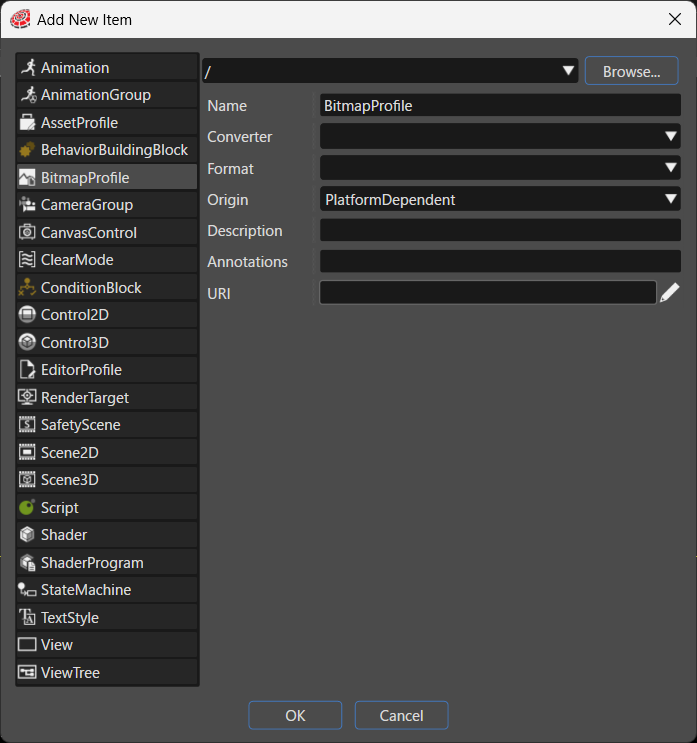
| Item | Description |
|---|---|
| Destination path | Specifies the folder in the solution where the system places the new item. Click Browse... to select an existing folder. |
| Name | Sets the name of the new item. |
| Converter | The system converts the exported bitmap with the converter specified here.
Note: Depending on which platform plugins are enabled, converters other than those listed above, such as |
| Format | The system converts the exported bitmap to the format (pixel format) specified here. The available values change according to the `Converter` selection. |
| Origin | Configures the pixel layout in the asset. When you select PlatformDependent, the system uses the platform setting of the corresponding engine according to the intended use of the bitmap (2D or 3D). If neither use applies, the system exports the imported content without flipping it.
|
| Description | Describes the new item in detail. |
| Annotations | Serves as storage for notes and other project-related information. The system exports the entered text to the HMI report. |
| URI | You can set any URI. If you enter a valid URI, clicking it launches the browser and displays the contents of the link. |
Format
The Format options change according to the value selected for Converter. The following sections list the options for each converter.
When DefaultBitmapConverter is selected
- RgbUnsignedShort565PixelFormat
- RgbaUnsignedShort4444PixelFormat
- RgbaUnsignedShort5551PixelFormat
- RgbUnsignedBytePixelFormat
- RgbaUnsignedBytePixelFormat
- AlphaUnsignedBytePixelFormat
- LuminanceUnsignedBytePixelFormat
- LuminanceAlphaUnsignedBytePixelFormat
- Etc2CompressedRgbPixelFormat
- Etc2CompressedSrgbPixelFormat
- Etc2Alpha1CompressedRgbaPixelFormat
- Etc2Alpha1CompressedSrgbaPixelFormat
- Etc2EacCompressedRgbaPixelFormat
- Etc2EacCompressedSrgbaPixelFormat
- SrgbUnsignedBytePixelFormat
- SrgbaUnsignedBytePixelFormat
- RgbFloatingPointR11G11B10PixelFormat
- RgbFloatingPoint9E5PixelFormat
- RgbaUnsignedIntRev10A2PixelFormat
- RgbHalfFloatPixelFormat
- RgbaHalfFloatPixelFormat
- RgbFloatPixelFormat
- RgbaFloatPixelFormat
When ArtInChipBitmapConverter is selected
- ArtInChipBitmapFormatARGB4444
- ArtInChipBitmapFormatARGB1555
- ArtInChipBitmapFormatRGB565
- ArtInChipBitmapFormatRGB888
- ArtInChipBitmapFormatARGB8888
- ArtInChipBitmapFormatXRGB8888
When AstcBitmapConverter is selected
- AstcCompressedRgba4x4
- AstcCompressedRgba5x4
- AstcCompressedRgba5x5
- AstcCompressedRgba6x5
- AstcCompressedRgba6x6
- AstcCompressedRgba8x5
- AstcCompressedRgba8x6
- AstcCompressedRgba8x8
- AstcCompressedRgba10x5
- AstcCompressedRgba10x6
- AstcCompressedRgba10x8
- AstcCompressedRgba10x10
- AstcCompressedRgba12x10
- AstcCompressedRgba12x12
When RZA1HBitmapConverter is selected
- RZA1HExtendedBitmapFormatA1
- RZA1HExtendedBitmapFormatA4
- RZA1HExtendedBitmapFormatA8
- RZA1HExtendedBitmapFormatARGB4444
- RZA1HExtendedBitmapFormatARGB1555
- RZA1HExtendedBitmapFormatRGB565
- RZA1HExtendedBitmapFormatARGB8888
- RZA1HExtendedBitmapFormatXRGB8888
- RZA1HExtendedBitmapFormatR8G8B8A8
- RZA1HExtendedBitmapFormatJpg
When Traveo2BitmapConverter is selected
Because the number of options is very large, the following list shows representative options.
- Traveo2BitmapFormatA1 / A2 / A4 / A8
- Traveo2BitmapFormatR3G3B2
- Traveo2BitmapFormatRleA1 / RleA2 / RleA4 / RleA8
- Traveo2BitmapFormatR4G4B4A4
- Traveo2BitmapFormatRleR5G5B5A1
- Traveo2BitmapFormatRleR5G6B5
- Traveo2BitmapFormatRleR8G8B8
- Traveo2BitmapFormatRleR8G8B8A8
- Traveo2BitmapFormatA4RGB4
- Traveo2BitmapFormatRGB8
- Traveo2BitmapFormatA8RGB8
- Traveo2BitmapFormatRleRGB1
- Traveo2BitmapFormatRleA4RGB4
- Traveo2BitmapFormatRleRGB8
- Traveo2BitmapFormatRleA8RGB8
- Traveo2ExtendedBitmapFormatRIaA1 / RIaA2 / RIaA4 / RIaA8
- Traveo2ExtendedBitmapFormatRIaR1G1B1A1
- Traveo2ExtendedBitmapFormatRIaR4G4B4A4
- Traveo2ExtendedBitmapFormatRIaR5G5B5A1
- Traveo2ExtendedBitmapFormatRIaR5G6B5
- Traveo2ExtendedBitmapFormatRIaR6G6B6
- Traveo2ExtendedBitmapFormatRIaR6G6B6A6
- Traveo2ExtendedBitmapFormatRIaR8G8B8A8
- Traveo2ExtendedBitmapFormatRIaR8G8B8
- Traveo2ExtendedBitmapFormatRIaRGB1
When VGLiteBitmapConverter is selected
- VGLiteExtendedBitmapFormatA8
- VGLiteExtendedBitmapFormatARGB4444
- VGLiteExtendedBitmapFormatARGB1555
- VGLiteExtendedBitmapFormatRGB565
- VGLiteExtendedBitmapFormatARGB8888
- VGLiteExtendedBitmapFormatXRGB8888