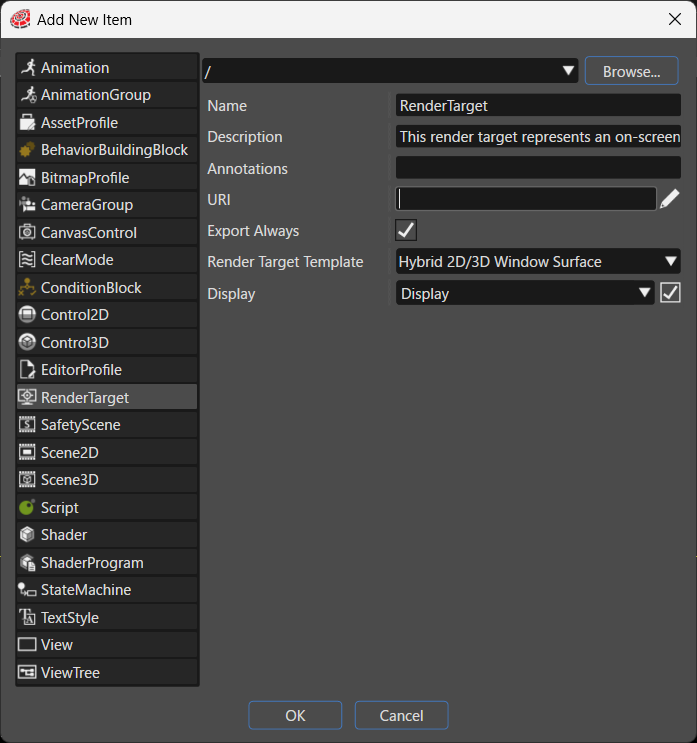
RenderTarget
Adds
a new render target to the solution. In Render Target Template, you select the type of render target to create.
Item
Description
Destination path
Specifies the folder in the solution where the system places the new item. Click Browse... to select an existing folder.
Name
Sets the name of the new item.
Description
Describes the new item in detail.
Annotations
Serves as storage for notes and other project-related information. The system exports the entered text to the HMI report.
URI
You can set any URI. If you enter a valid URI, clicking it launches the browser and displays the contents of the link.
Export Always
Specifies whether the system always includes this item as part of the asset. When enabled, the system always exports the item during asset generation.
Render Target Template
Specifies the render target template, which is the type of the item as defined in Candera.
Hybrid 2D/3D Window Surface: Creates the render target as a window surface that appears on the screen.
Hybrid 2D/3D Off-Screen Surface: Creates the render target as an off-screen surface, which you can reuse as a texture.
Software Layer: Creates the render target as a software layer.
Display
Specifies the display that the render target links to. You can set this property only when `Render Target Template` is `Hybrid 2D/3D Window Surface`.
Display: Links the render target to the standard display.
(Empty): Not specified