
ShaderProgram
Adds a new shader program to the solution. The shader program pairs a fragment shader with a vertex shader, and you can apply it to the appearance of a node.
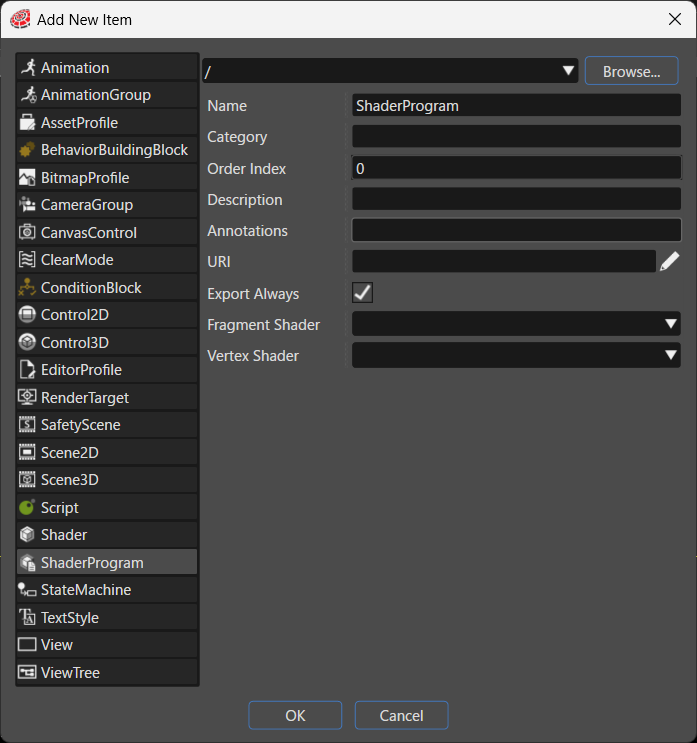
| Item | Description |
|---|---|
| Destination path | Specifies the folder in the solution where the system places the new item. Click Browse... to select an existing folder. |
| Name | Sets the name of the new item. |
| Category | Specifies the category that the new item belongs to. The Toolbox uses this category to classify the item. |
| Order Index | The Toolbox uses the Order Index to sort controls. |
| Description | Describes the new item in detail. |
| Annotations | Serves as storage for notes and other project-related information. The system exports the entered text to the HMI report. |
| URI | You can set any URI. If you enter a valid URI, clicking it launches the browser and displays the contents of the link. |
| Export Always | Specifies whether the system always includes this item as part of the asset. |
| Fragment Shader | A shader program that runs on the GPU (Graphics Processing Unit) to perform complex per-pixel effects. You select the fragment shader from the fragment shaders listed in the Shader panel, that is, the `Shader` items defined in the solution whose `Type` is fragment shader. |
| Vertex Shader | A shader program that runs on the GPU (Graphics Processing Unit) to perform complex per-vertex effects. You select the vertex shader from the vertex shaders listed in the Shader panel, that is, the Shader items defined in the solution whose Type is vertex shader. |