
AI Service
On this panel, you configure the connection that the AI features in Scene Composer use.
The features concerned are the Docs Agent panel and Search Helper. These features send questions and instructions to the AI service and receive answers. On AI Service, you configure how Scene Composer connects to Candera Operator, which relays that communication.
Every setting has a default value, and the features normally work with these defaults. You do not need to change them. Change a setting only when a connection problem occurs, or when you must specify the connection target explicitly.
Prerequisites
Candera Operator requires .NET Runtime 10.0. If CGI Studio was delivered with an installer, the installer also installs the runtime, and you do not have to do anything. If CGI Studio was delivered without an installer, install the runtime yourself before you use the AI features. If the runtime is missing, the requirements check dialog that appears when you start Scene Composer lists it as a missing item.
Settings
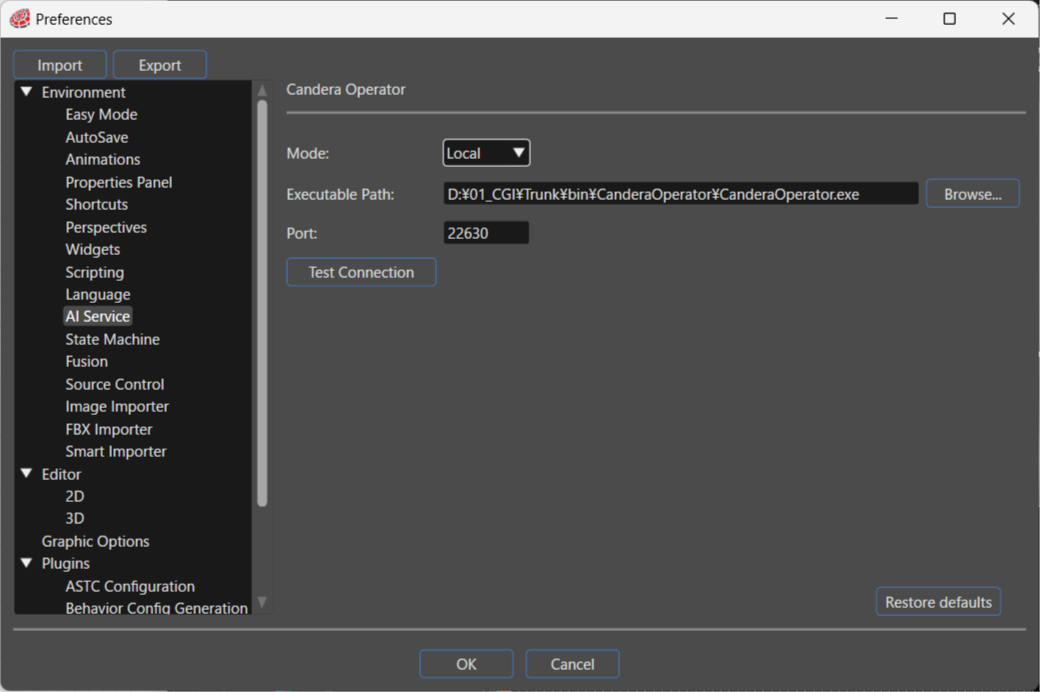
| Setting | Description |
|---|---|
| Mode | Selects how Scene Composer connects to Candera Operator, either Local or Network. With Local, Scene Composer starts the Candera Operator process and connects to it. With Network, Scene Composer connects to a Candera Operator that already runs. Depending on your selection, the panel shows either Executable Path or Host URL. |
| Executable Path |
Appears when Mode is set to Local. Specifies the path to the Candera Operator executable. You can also select the file with Browse.... |
| Host URL |
Appears when Mode is set to Network. Specifies the Candera Operator to connect to, as a |
| Port | Specifies the port number that Scene Composer uses to communicate with Candera Operator. A default port number is already set. |
| Test Connection | Tests whether Scene Composer can connect to Candera Operator with the current settings. The button becomes available after you change a setting, and a pop-up shows whether the connection succeeded. |
| Restore defaults | Click this button to restore the settings to their initial state. |
Choosing a Mode
Local
Scene Composer starts the Candera Operator process from the executable that you specify in Executable Path, and connects to it on the port number that you specify in Port. Use this mode under normal circumstances.
Network
Scene Composer connects to a Candera Operator that already runs. It connects to the host that you specify in Host URL and the port number that you specify in Port. In this mode, you do not specify an executable path, and Scene Composer does not start the Candera Operator process.
You can specify only localhost or 127.0.0.1 as the connection target. You cannot connect to a Candera Operator that runs on another machine on the network.
About Candera Operator
Candera Operator is a server that relays the communication between the AI features in Scene Composer and the AI backend. It runs as an application separate from Scene Composer.
AI features connect to Candera Operator first, and Candera Operator relays the communication to the AI backend. Because all AI features share the same relay point, they use a single authentication method and a single communication method. The authentication relies solely on the HASP key, and the product embeds no API key. Scene Composer sends only the identifier of the HASP key; it never sends the key itself. Candera Operator itself does not require a HASP key, because the connecting Scene Composer provides it.
In Local mode, Scene Composer starts Candera Operator automatically. It starts the process when you send the first question or instruction to an AI feature.
In Local mode, do not start Candera Operator manually. A manually started process conflicts with the process and the port that Scene Composer starts, and the connection fails. To use a Candera Operator that you started yourself, set Mode to Network.
Troubleshooting
| Symptom | What to check |
|---|---|
| Test Connection fails | Check that the path to the Candera Operator executable that you specify in Executable Path is correct. Also check that no other system uses the port number that you specify in Port. If the port number conflicts, change the value of Port. |
The panel of an AI feature shows Client could not connect! |
Scene Composer cannot connect to Candera Operator. Check the settings on Environment > AI Service, and then test the connection with Test Connection. Also check that .NET Runtime 10.0 is installed. |