
Configure Source Control
Configure Source Control
When working with a solution stored in a repository and using Scene Composer's built-in source control integration, you must configure an external comparison and merge tool.
To configure this, open the Preferences dialog (File > Preferences in the menu bar). In the Source Control section, specify the application to be used for merge and diff operations. You can also define the command-line parameters required for each operation (e.g. Merge and Diff).
Before performing any merge operations, ensure that the external merge tool is enabled by selecting the corresponding checkbox.
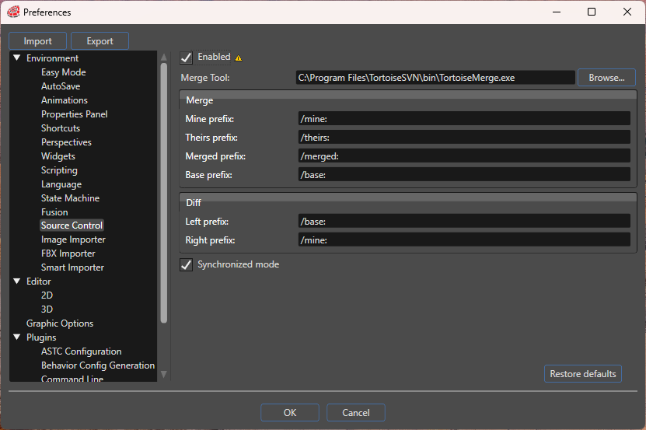
| Enabled | If enabled, the use of the configured merge tool is enabled. |
| Merge Tool | Configures the path to the external merge tool to use. |
| Merge | Specifies the commands for merge operations. |
| Diff | Specifies the commands for diff operations. |
| Synchronized mode | If enabled, Scene Composer automatically retrieves the solution status from the server. Because communication with the server can be time-consuming, you may choose to disable this option. In that case, you can manually update the status by selecting Refresh status from the source control context menu whenever needed. |
The value of the Enabled checkbox is evaluated only when a solution is opened or created.